Data modeling is like defining schema for the graph database
When performing the graph data modeling process for an application, you will need at least two types of models
- Data Model
- The data model describes the labels, relationships, and properties for the graph. It does not have specific data that will be created in the graph
- Instance Model
- An important part of the graph data modeling process is to test the model against the use cases. To do this, you need to have a set of sample data that you can use to see if the use cases can be answered with the model
- Labels will be
Nounsand will be inCamelCase- Also when labeling nodes keep these things in mind- Keep labels
Semantically Orthogonal, It means two labels should have nothing in common and don’t keep them redundant like, not using region as label for every node, in place of that, you can keep the region in metadata - Represent in Class hierarchies, like store like
Continent_Countryand then likeContinent_Country_State
- Keep labels
- Relationships will be
Verbsand will be inCapital Letters. In this direction is not required, but good to give, If not given then it will be inferred in runtime during the query
Refactoring
It is the process of changing the data model and the graph. This is to improve the graph, such that it perform well and improve accuracy
Here are steps to do it
- Design the new data model
- Write Cypher code to transform the existing graph to implement the new data model
- Retest all use cases, possibly with updated Cypher code
Handling duplicate Data
- Improve Query performance
- Reduce amount of storage required for graph
Q Suppose we want to add a language to all the nodes, how do we handle duplicates ?
A Create a Language node from the Movie node languages list field, which connects with every Movie node with relation IN_LANGUAGE and after creating language nodes, delete the language list from movie nodes and with that we can handle duplicates. As we can only add the language for the nodes which not have connection with the input language node
MATCH (m:Movie)
UNWIND m.languages AS language
MERGE (l:Language {name:language})
MERGE (m)-[:IN_LANGUAGE]->(l)
SET m.languages = null
UNWIND clause to separate each element of the languages property list into a separate row value that is processed later in the query
Specific Relationships
- Let’s say we need to get the actors or directors worked in a particular year
MATCH (p:Person)--(m:Movie)
WHERE m.released STARTS WITH '1995'
RETURN DISTINCT p.name as `Actor or Director`
This is good but, we first query all the movie nodes and then get distinct actors and directors from that movies
- Other than this, relationships are better, but if we want to do it with relationships, then we need to add relationship for every year like,
ACTED_IN_1992,ACTED_IN_1993,ACTED_IN_1994,DIRECTED_1992,DIRECTED_1995 - But for this it takes a lot of memory and space, but it’s worth it for the speed
- Now to create, the relationships we use
apoc.merge.relationshipprocedure that allows you to dynamically create relationships in the graph. It uses the 4 leftmost characters of the released property for a Movie node to create the name of the relationship
MATCH (n:Actor)-[:ACTED_IN]->(m:Movie)
CALL apoc.merge.relationship(n,
	'ACTED_IN_' + left(m.released, 4),
	{},
	{},
	m ,
	{} ) YIELD rel
RETURN count(*) AS `Number of relationships merged`;- Now we can write the query as
MATCH (p:Person)-[:ACTED_IN_1995|DIRECTED_1995]-()
RETURN p.name as `Actor or Director`
Intermediate Nodes
When we want to connect two nodes with a context, then we use Intermediate nodes
for example take this graph
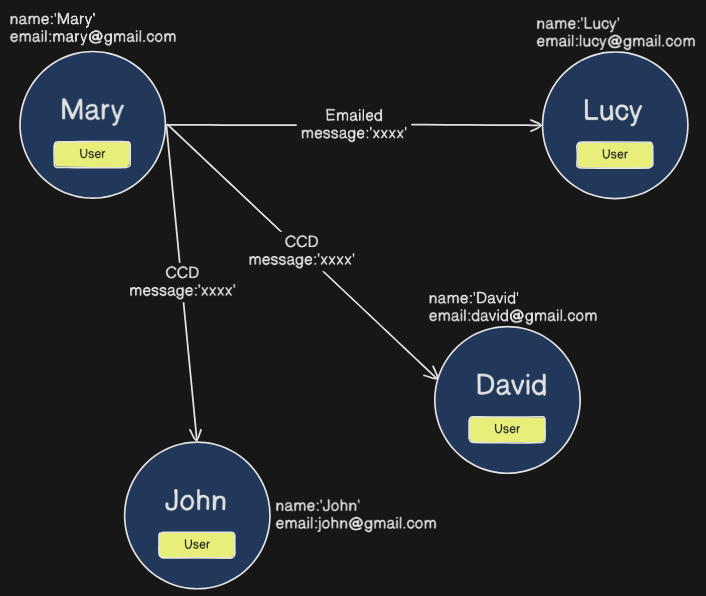 Here we have the message passing through all and not feasible, now we can introduce an intermediate node called Email and can pass the data through it like this
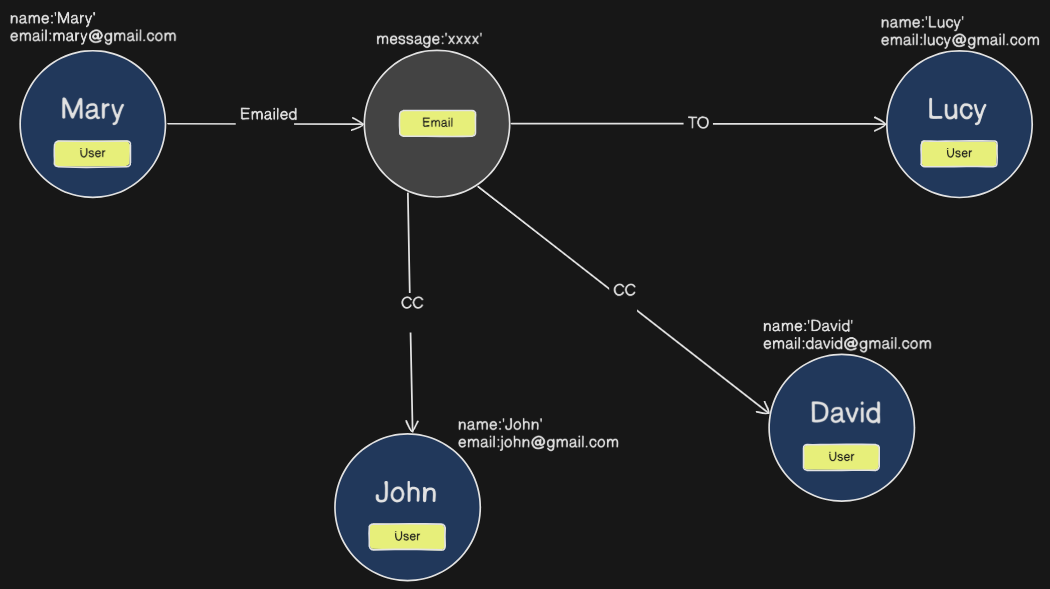 This increases the context understanding in the graph database