We need to import data into the graph database, and the data can be in many formats like Relational Database Management Systems (RDBMS), Web APIs, Public data directories, BI tools, Excel, Flat files (CSV, JSON, XML)
Here is the one shot diagram to decide the method that needed to be used to import data
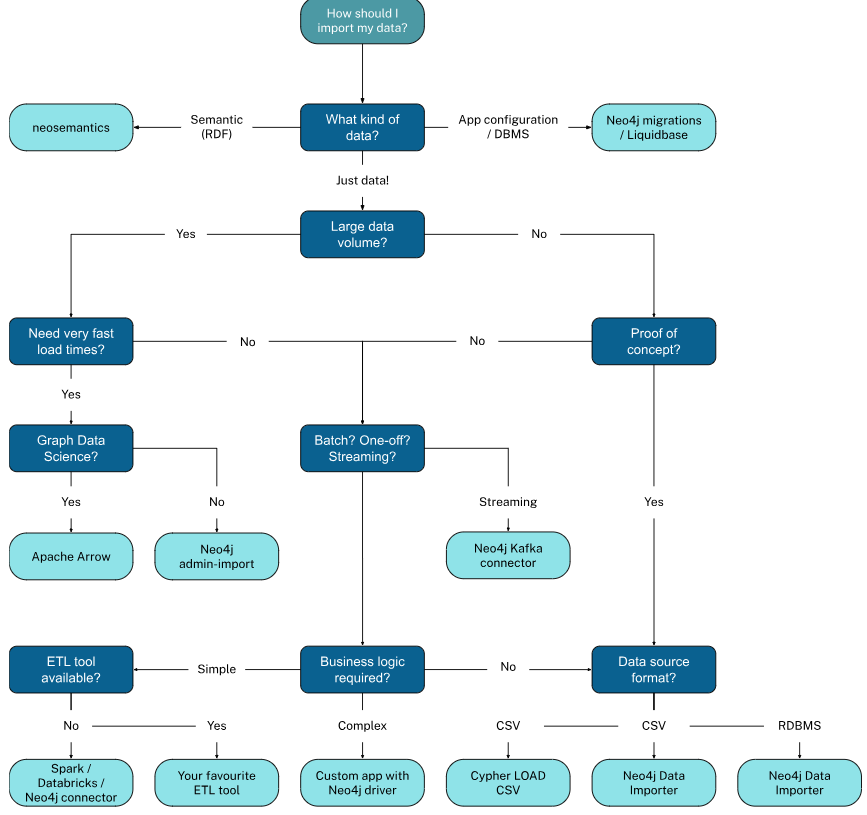 Different tools to import data
- Data Importer: The Neo4j Data Importer is a no-code tool through which we can model the data and import it into Neo4j
- Cipher & Load CSV: Importing data via code - Load from CSV ⇒ Create the data model ⇒ Transform and aggregate Data ⇒ Control Transactions
LOAD CSV WITH HEADERS FROM 'file:///transactions.csv' AS row MERGE (t:Transactions {id: row.id}) SET t.reference = row.reference, t.amount = toInteger(row.amount), t.timestamp = datetime(row.timestamp) - Neo4j Admin: The neo4j-admin import command line interface supports importing large data sets.
neo4j-admin importconverts CSV files into the internal binary format of Neo4j and can import millions of rows within minutes - ETL (Extract, Transform, Load) Tool
- Custom Application: Building a custom application to load data into the graph database
Constraints & Indexes
Constraints: Constraints are a specialized type of index that enable you to control if a property value must exist and/or is unique. If a constraint is violated when a node or relationship is created or updated, an error is raised. Constraints are the reason that we use MERGE when creation
The constraint ensures the property is unique for all nodes with that label. Setting the unique ID for the Movie node to movieId, a unique constraint named movieId_Movie_uniq is created against the movieId property
While naming a constraint, It’s a good practice to end the name with _unique
- Creating a Uniqueness constraint for multiple properties for a node
CREATE CONSTRAINT <constraint_name> IF NOT EXISTS FOR (x:<node_label>) REQUIRE (x.<property_key1>, x.<property_key2>) IS UNIQUE - Creating the Existence constraint - Suppose we want to enforce that all
Personnodes must have a value for anamepropertyCREATE CONSTRAINT Person_name_exists IF NOT EXISTS FOR (x:Person) REQUIRE x.name IS NOT NULL - Creating an existence constraint for a relationship - we want to enforce that all
RATEDrelationships must have a value for theratingpropertyCREATE CONSTRAINT RATED_rating_exists IF NOT EXISTS FOR ()-[x:RATED]-() REQUIRE x.rating IS NOT NULL - Creating a Node Key - It is a specialized type of constraint that combines both Uniqueness and Existence
CREATE CONSTRAINT <constraint_name> IF NOT EXISTS FOR (x:<node_label>) REQUIRE x.<property_key> IS NODE KEY - Deleting Constraints
DROP CONSTRAINT <Person_name_url_nodekey>
Indexes: When you query data, indexes improve performance by quickly finding the nodes with the specified property. An index is created automatically for the unique ID property. For example, the index movieId_Movie_uniq will be created for the movieId property on the Movie node
Uniqueness constraints are implemented as indexes, but there are more types of indexes that you can create and use
RANGE Indexes- A b-tree is a common implementation of an index that enables you to sort values. A RANGE index in Neo4j is a proprietary implementation of a b-tree. You can define a RANGE index on a property of a node label or relationship type. The data stored in the index can be any type. E.g.:>,>=,<,<=,=(TEXT performs better),STARTS WITH,IS NOT NULL- Creating Range Indexes for single property of node
CREATE INDEX <index_name> IF NOT EXISTS FOR (x:<node_label>) ON x.<property_key>- Creating Range Indexes for single property of relationship
CREATE INDEX <index_name> IF NOT EXISTS
FOR ()-[x:<RELATIONSHIP_TYPE>]-()
ON (x.<property_key>)
COMPOSITE Indexes- It’s simple using multiple properties (mostly used properties) as Indexes, such that queries are faster. A composite index combines values from multiple properties for a node label or for relationship type- Create Composite Indexes for multiple properties of node
CREATE INDEX <index_name> IF NOT EXISTS FOR (x:<node_label>) ON (x.<property_key1>, x.<property_key2>,...)- Create Composite Indexes for multiple properties of the relationship
CREATE INDEX <index_name> IF NOT EXISTS
FOR ()-[x:<RELATIONSHIP_TYPE>]-()
ON (x.<property_key1>, x.<property_key2>,...)
TEXT Indexes- A TEXT index supports node or relationship property types that must be strings. It performs well for=,ENDS WITH,CONTAINS, List Membership inx.prop. It performs better when there is a lot of duplication data in the graph and uses less memory in the graph- Create Text Index for Node property
CREATE TEXT INDEX <index_name> IF NOT EXISTS FOR (x:<node_label>) ON x.<property_key>- Create Text Index for Relationship property
CREATE TEXT INDEX <index_name> IF NOT EXISTS
FOR ()-[x:<RELATIONSHIP_TYPE>]-()
ON (x.<property_key>)
FULL TEXT Indexes- A full-text index is based upon string values only, but provides additional search capabilities that you do not get from RANGE or TEXT indexes. Full-text indexes rely on Apache Lucene for their implementation- Unlike RANGE and TEXT indexes, you must call a procedure to use a full-text index at runtime. That is, the query planner will not automatically use a full-text index unless you specify it in
- A full-text schema index can be used for:
- Node or relationship properties
- Single property or multiple properties
- Single or multiple types of nodes (labels)
- Single or multiple types of relationships
- Creating a FULLTEXT Index
CREATE FULLTEXT INDEX <index_name> IF NOT EXISTS FOR (x:<node_label>) ON EACH [x.<property_key>]- Full-text query to retrieve data from the nodes - This query uses Lucene’s full-text query language to retrieve the nodes
CALL db.index.fulltext.queryNodes ('Movie_plot_ft', 'murder AND drugs') YIELD node RETURN node.title, node.plot- Creating a full-text index for a relationship property
CREATE FULLTEXT INDEX <index_name> IF NOT EXISTS FOR ()-[x:<RELATIONSHIP_TYPE>]-() ON EACH [x.<property_key>]- Creating a full-text index for multiple node labels and properties
CREATE FULLTEXT INDEX <index_name> IF NOT EXISTS (x:<node_label1> | <node_label2> | ...) ON EACH [x.<property_key1>, x.<property_key2>,...]- Retrieving the score for a full-text search
CALL db.index.fulltext.queryNodes(
 'Actor_bio_Movie_plot_title_ft',
 'title: matrix reloaded')
 YIELD node, score
WITH score, node
WHERE node:Movie
RETURN node.title, score
POINT Indexes- They are designed to handle geographic or spatial data types, enabling the storage and retrieval of points in a two-dimensional space (latitude and longitude) or even in higher dimensions- Create Point Index for Node Property
CREATE POINT INDEX <index_name> IF NOT EXISTS FOR (x:<node_label>) ON x.<point_property>- Create Point Index for Relationship Property
CREATE POINT INDEX <index_name> IF NOT EXISTS
FOR ()-[x:<RELATIONSHIP_TYPE>]-()
ON (x.<point_property>)
LOOKUP Indexes- This are created by Neo4j, don’t change or delete them, please!!!!
Note: when we are inserting data into a empty graph then we should take care of two things
- Create the constraints before you load the data into the graph
- Create the indexes after you load the data into the graph
Controlling Index Usage
- Default Index Usage
Single Index by Default: When you execute aMATCHclause, Neo4j uses a single index by default to optimize the query. The query planner decides which index to use based on the properties and conditions specified in the query
PROFILE MATCH (p:Person)-[:ACTED_IN]->(m:Movie)<-[:DIRECTED]-(p2:Person) WHERE p.name CONTAINS 'John' AND p2.name CONTAINS 'George' RETURN p.name, p2.name, m.title - Specifying a Query Hint
Using Index Hint: You can explicitly tell the query planner which index to use by specifying a query hint withUSING INDEX. This can be useful if you believe a specific index will yield better performance
PROFILE MATCH (p:Person)-[:ACTED_IN]->(m:Movie)<-[:DIRECTED]-(p2:Person) USING INDEX p:Person(name) WHERE p.name CONTAINS 'John' AND p2.name CONTAINS 'George' RETURN p.name, p2.name, m.title - Using Multiple Indexes
Multiple Index Usage: In some cases, using multiple indexes can enhance query performance. You can specify multipleUSING INDEXclauses for different parts of the query
PROFILE MATCH (p:Person)-[:ACTED_IN]->(m:Movie)<-[:DIRECTED]-(p2:Person) USING INDEX p:Person(name) USING INDEX p2:Person(name) WHERE p.name CONTAINS 'John' AND p2.name CONTAINS 'George' RETURN p.name, p2.name, m.title- This query uses indexes for both ends of the path, potentially improving performance by reducing database hits
- Query Hints for Relationships
Index on Relationships: You can also specify indexes on relationships. For example, if you have an index on theRATED.ratingproperty, you can use it in your queries. This query does not use the index by default, as the planner determines it may not improve performance
PROFILE MATCH
(u:User)-[r:RATED]->(m:Movie)
WHERE
u.name CONTAINS 'Johnson'
AND
r.rating = 5
RETURN u.name, r.rating, m.title
Forcing Relationship Index Usage: This forces the use of the index on theRATEDrelationship, but it may not yield better performance, demonstrating the importance of testing any query hints
PROFILE MATCH
(u:User)-[r:RATED]->(m:Movie)
USING INDEX r:RATED(rating)
WHERE
u.name CONTAINS 'Johnson'
AND
r.rating = 5
RETURN u.name, r.rating, m.title
Indexing Limitations
- B-tree indexes can be backed by either
native-btree-1.0(default) orlucene+native-3.0. The former supports native indexing for all types, while the latter supports Lucene for single-property strings - The
native-btree-1.0has a key size limit of 8167 bytes. Transactions exceeding this limit will fail, and indexes may become unusable if the limit is reached during population. Thelucene+native-3.0provider has a higher limit of 32766 bytes - The
native-btree-1.0provider has limited support forENDS WITHandCONTAINSqueries, which are less optimized compared toSTARTS WITH,=, and<>. Thelucene+native-3.0provider offers full support for these queries - Non-composite indexes can violate size limits with long strings or large arrays. Composite indexes have stricter limits, especially if they contain strings or arrays, and the total size of all elements must not exceed 8167 bytes
- It is worth noting that common characters, such as letters, digits and some symbols, translate into one byte per character. Non-Latin characters may occupy more than one byte per character. Therefore, for example, a string that contains 100 characters or less may be longer than 100 bytes if it contains multi-byte characters. More specifically, the relevant length in bytes of a string is when encoded with UTF8