DRM Clear key Encryption
Clear Key Encryption represents the foundational DRM model where content protection relies purely on cryptographic encryption without leveraging secure hardware or trusted execution environments
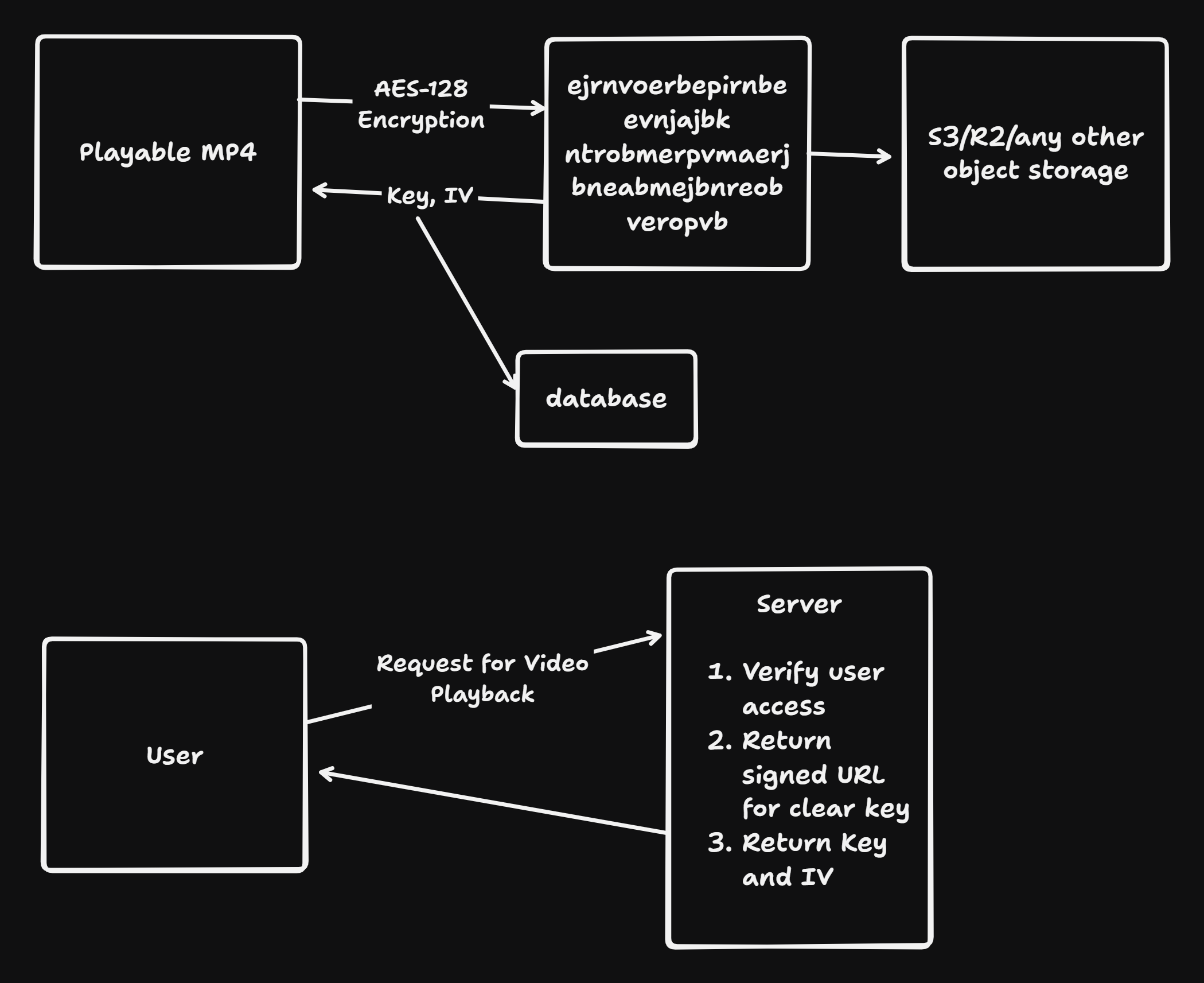 Content Preparation Phase:
- A playable input video format file (MP4, DASH/CMAF, HLS) undergoes encryption using AES-128 in CTR (Counter) mode or CBC (Cipher Block Chaining) mode depending on the container format
- The encryption transforms the plaintext video bitstream into ciphertext, rendering it unreadable without the correct decryption key and initialization vector (IV)
- The IV (Initialization Vector) is a 128-bit random value that ensures identical plaintext blocks produce different ciphertext blocks when encrypted with the same key, preventing pattern analysis attacks
Key Management Infrastructure:
- Content Encryption Keys (CEK): The actual AES-128 symmetric keys used to encrypt/decrypt media segments
- Key Identifiers (KID): Unique identifiers (typically 128-bit) that map encrypted content to their corresponding keys
- Initialization Vectors (IV): Random 128-bit values used in CBC/CTR modes to prevent deterministic encryption patterns
- These cryptographic materials are stored in secure databases, completely separate from the actual encrypted video content stored in CDNs
Access Control Flow:
- User Authentication Request: Client initiates playback request through HTTPS to the origin server
- Access Verification: Server performs multi-layer verification:
- User authentication (JWT tokens, OAuth, session validation)
- Authorization checks (subscription status, geographic restrictions, device limits)
- DRM policy validation (concurrent streams, device binding, expiration windows)
- Signed URL Generation: Server generates time-limited, cryptographically signed URLs pointing to encrypted video segments in the CDN
- Signature includes: content ID, user ID, timestamp, expiration, device ID
- Prevents unauthorized access even if the URL is intercepted
- Key Delivery: Upon successful verification, server returns:
- The symmetric encryption key (CEK)
- The initialization vector (IV)
- Key expiration metadata
- License constraints and policies
- Client-Side Decryption: The video player uses these materials to decrypt incoming segments in real-time
Applications:
- Employee training videos with strict device policies
- Internal corporate communications
- Educational institutions with managed networks
- Any scenario where users are pre-screened and trusted
Limitations:
- Network-Level Vulnerability:
- Keys are transmitted across the network in plaintext or with inadequate protection
- Packet sniffing captures key material before it reaches the client
- Man-in-the-middle (MITM) attacks can intercept keys despite HTTPS (weak implementation, SSL stripping)
- The fundamental weakness: keys traverse untrusted networks before reaching the client
- Recording Vulnerability:
- Once decrypted, the video exists in the client’s memory and framebuffer
- Local screen recording tools (OBS, QuickTime, Windows Game Bar) capture the unencrypted video directly from the output buffer
- No mechanism prevents this because the decrypted video must be rendered to the display
- Acceptable use case: Internal/enterprise streaming where users are trusted and physical security exists
DRM Widevine Encryption
Widevine operates as a three-tier security system with distinct security levels (L1, L2, L3), each providing different protections based on device capabilities and hardware integration
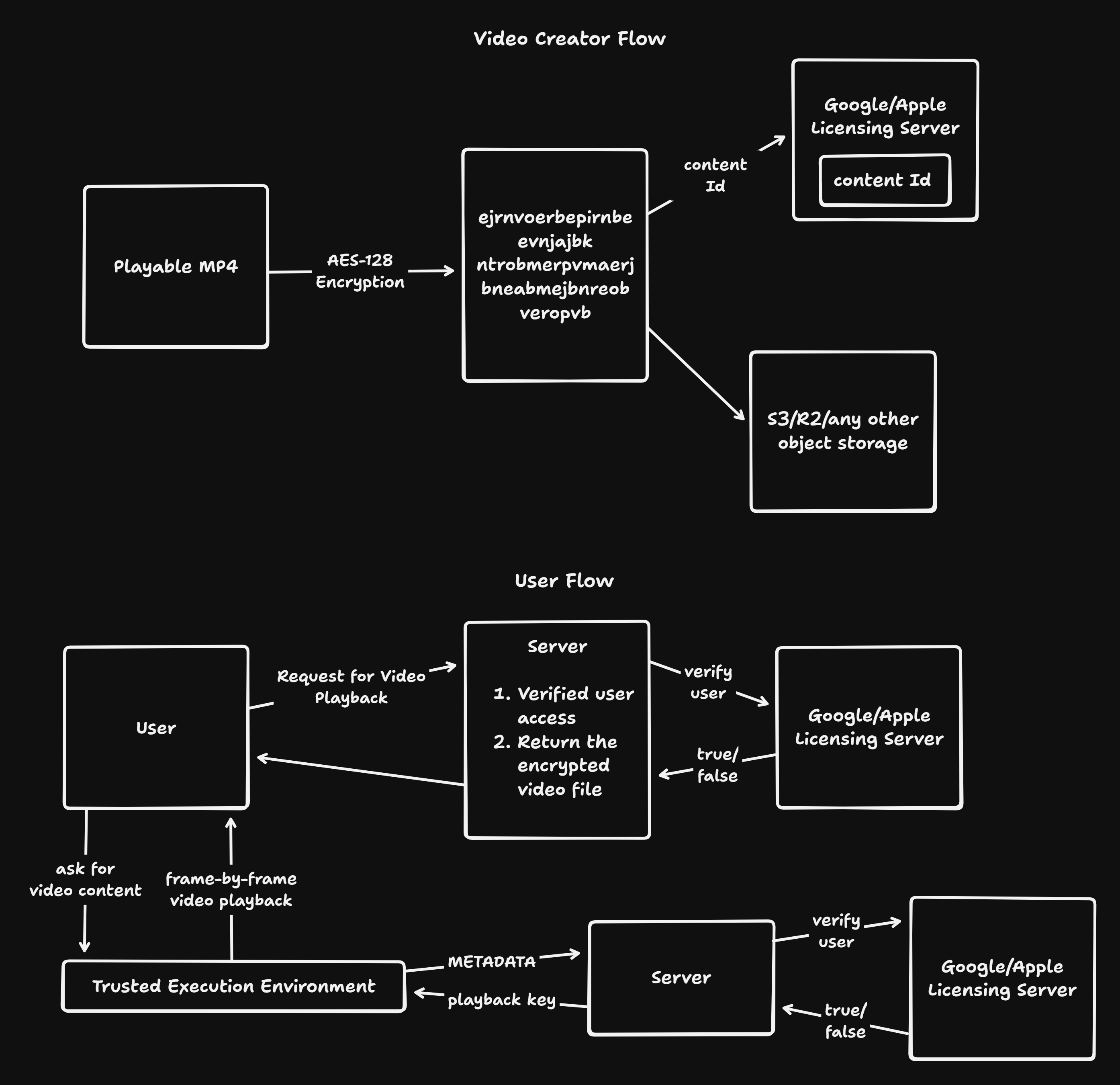 Widevine is a DRM company that is owned by Google(as per 2025). Here the steps are the same as above until encrypting the file, but we use licensing servers(hosted by google) to verify the user eligibility to play back, this verification is done wrt content Id that we give to google when the file is encrypted
Later when the user asks for the playback of the video, we verify the user via licensing server which will return the encrypted video file, and this encrypted file will get decrypted and ran in an Trusted Execution Environment(TEE) in our machine, by authenticating itself again by the Licensing Server and will only send the chunks of video rather than the whole video for the user playback
And this TEE is done differently in different browsers:
- Chrome(Widevine) - It does the Decryption in the browser level but not in the javascript layer, this is secure but not much secure, that’s the reason we can only watch at highest resolution of 720p of Netflix in Chrome, because even if the content get’s leaked it shouldn’t be much quality content
- Safari(FairPlay) - It does the Decryption in the hardware level, as the hardware is also owned by Apple, they’ve full control on it wrt the encryption standards thus Netflix on safari gives us upto 1080p 4K resolution video
Widevine Security Layers
Level 1 (L1) - Hardware-Based Maximum Security:
- Hardware Integration Requirements:
- Mandatory Trusted Execution Environment (TEE) integration
- Device must have dedicated secure coprocessor (ARM Trust Zone on Android, Qualcomm Snapdragon secure execution, etc.)
- All cryptographic operations execute in isolated hardware processor with its own memory, cache, and execution pipeline
- Operating system cannot directly access TEE memory or execution context
- Decryption Process in L1:
Encrypted Segment → CDM (Browser) → OEMCrypto Module (TEE) ↓ [Hardware Key Derivation] [AES-128 CTR Decryption] [HDCP Output Protection] ↓ Decrypted Video Frame (stays in TEE) ↓ [Hardware Video Decoder in TEE] [H.264/H.265 Decompression] ↓ Decoded YUV Frame (never exposed to main OS) ↓ [HDCP 2.2 Protected Display Output] - Content Decryption:
- Full encryption key never exposed to main OS or browser
- HMAC-SHA256 signatures on license data prevent tampering
- Each device has a unique 128-byte keybox embedded at manufacturing:
- 32-byte Device ID (unique hardware identifier) - 16-byte Device Key (AES key known only to OEMCrypto) - 72-byte Provisioning Token (encrypted key material)
- 4-byte Magic Number (“kbox”)
- 4-byte CRC-32 checksum for integrity
- Keybox cannot be extracted without triggering tamper detection
- Quality Restrictions:
- Up to 4K/UHD (3840×2160) with HDR permitted for L1 devices
- HDCP 2.2 output protection mandatory for HD+ content
- Widevine ecosystem mandates that L1 devices must pass device certification tests
- Runtime attestation verifies device hasn’t been rooted/jailbroken
- Netflix Policy on L1:
- Netflix Premium subscribers on L1 Android devices can stream 4K content
- Desktop Chrome cannot achieve L1 certification (software-only), capped at 720p
- iOS with FairPlay can achieve 4K on Safari
Level 2 (L2) - Software Encryption, Hardware Integrity Checking:
- Processing Distribution:
- Decryption happens in TEE’s OEMCrypto Module
- But decoding and rendering happen in main OS
- TEE provides cryptographic isolation without full video processing isolation
Encrypted Segment → CDM Browser → OEMCrypto (TEE) → Decryption ↓ Decrypted H.264 Stream ↓ [Main OS - Software H.264 Decoder] [Decompression - Main CPU] ↓ Raw Video Frames (YUV/RGB) ↓ [Display Output - HDCP 1.4+] - Why This Matters:
- Decryption is protected (cannot be snooped easily)
- But decoded frames exist in main OS memory
- More vulnerable to memory inspection tools, kernel exploits, and privilege escalation
- Still safer than L3 because key material never reaches main OS
- Content Restrictions:
- Maximum 1080p (Full HD) streaming
- Restricted to HD content, not 4K
- Rationale: If L2 device is compromised, attacker gains HD content (expensive) rather than 4K (extremely expensive for studios)
- Devices with L2:
- Older high-end smartphones
- Some tablets with TEE but less stringent certification
- Smart TVs with moderate security
Level 3 (L3) - Software-Only, Maximum Vulnerability:
- No Hardware Involvement:
- All decryption happens in browser-level CDM
- No TEE, no secure coprocessor
- Operating system has full access to all operations
- Used for low-end devices without TEE support
Encrypted Segment → CDM in Browser Process ↓ [Software AES Decryption] [JavaScript-blocked but browser-level] ↓ Decrypted Video Stream ↓ [Software H.264 Decoder - Main OS] ↓ Display Output - Security Characteristics:
- License keys reside in browser memory (accessible to malicious processes with sufficient privileges)
- Advanced rootkits/kernel modules can dump memory and extract keys
- Decrypted frames available in framebuffer without protection
- HDCP is often not enforced (depends on device)
- Content Restrictions:
- Maximum 720p (HD Ready) streaming
- Acceptable loss if device is compromised
- Netflix restricts to SD/HD quality on L3 devices regardless of subscription tier
- Firefox on Linux, Chrome on older Android devices, unverified browsers = L3
- Why Netflix Restricts to 720p:
- Studios mandate: loss acceptable if 720p leaks, but not 4K
- 720p file is ~2 GB for 2-hour movie
- 4K file is ~25-50 GB for 2-hour movie
- Economic incentive: prevent storage/distribution of premium quality content
Widevine License Server Architecture
License Request Generation:
- Client-Side License Request Initiation: When the video player encounters encrypted content (indicated by PSSH box in MP4), it:
- Detects Protection System Specific Header (PSSH) containing DRM system UUID
- Queries the browser’s CDM about available key systems:
navigator.requestMediaKeySystemAccess() - For Widevine, gets
"com.widevine.alpha"key system identifier
- CDM Session Creation
// EME JavaScript API Flow const keySystemAccess = await navigator.requestMediaKeySystemAccess( 'com.widevine.alpha', [{initDataTypes: ['cenc']}] ); const mediaKeys = await keySystemAccess.createMediaKeys(); video.mediaKeys = mediaKeys; const session = mediaKeys.createSession('temporary'); // or 'persistent-license' // CDM generates license request session.generateRequest('cenc', psshBox); - License Request Message: The CDM generates a binary license request containing
-
Device credentials and Device ID
-
Session ID (unique identifier for this playback session)
-
Content Key ID (KID) being requested
-
Supported key formats
-
Device security level declaration
-
Optional: Remote attestation data (ChromeOS)
-
Structure (protobuf format):
message LicenseRequest { bytes client_token; // Device authentication token bytes content_id; // Content identifier string device_model; // Device model string string device_type; // Device type (ANDROID, LINUX, etc.) int32 platform_key_version; // Device key version repeated bytes session_key; // ECC public key for key exchange bytes signature; // Request signature (HMAC-SHA256 with device key) } -
- JavaScript Application Relays Request: The EME API provides the license request message through
session.onmessageeventsession.addEventListener('message', (event) => { const licenseRequest = event.message; // ArrayBuffer // Convert to base64 and send to backend fetch('/api/get-widevine-license', { method: 'POST', body: licenseRequest, headers: { 'Content-Type': 'application/octet-stream' } }) .then(response => response.arrayBuffer()) .then(licenseBlob => { session.update(licenseBlob); // Feed license back to CDM }); });
Critical Security Property: The JavaScript application never parses or decrypts the license request - it’s an opaque blob that only the CDM can interpret. This prevents tampering
License Server Validation:
- Backend License Server Processing:
Device License Request (opaque to backend) ↓ [Unmarshal protobuf message] ↓ [Verify HMAC signature with known device keys] ↓ [Authenticate user/session] [Check subscription status] [Verify device certification] [Apply DRM policies] ↓ [Generate license blob with content keys] ↓ [Sign license with server key] [Encrypt license contents] ↓ License Response (binary protobuf) - Server-Side Verification Steps:
- Device Authentication:
- Extract Device ID from license request
- Query device provisioning database
- Verify device was provisioned by Widevine server
- Check device blacklist (for rooted/jailbroken devices)
- Security Level Verification:
- Decode platform verification status from request
- For L1: Verify remote attestation challenge proof
- For L3: Accept but apply quality restrictions
- Reject unverified/tampered platforms
- Device Authentication:
- License Blob Construction: The license response is a signed, encrypted message containing
message License {
    bytes id;                            // License ID
    repeated KeyContainer key_container; // Decryption keys
    int64 license_start_time;            // When license becomes valid
    int64 license_duration_seconds;      // How long license is valid
    bool play_right_enabled;             // Can play?
    int32 max_hdcp_version;              // HDCP 1.4, 2.0, 2.1, 2.2
    int64 creation_time;                 // License generation timestamp
}

message KeyContainer {
    bytes type;                          // "CONTENT", "KEY_CONTROL", etc.
    repeated Key key;                    // Key material
}

message Key {
    bytes id;                            // Key ID (KID)
    bytes key_data;                      // Encrypted content key
    bytes iv;                            // Initialization vector
}
- Encryption Layers:
- Content keys encrypted with device public key
- License blob encrypted with license key
- Complete message signed with HMAC-SHA256
- Base64 or binary encoding for transport
License Delivery Back to Client:
- License Response Transmission:
- The backend sends the license blob over HTTPS:
- Entire response is encrypted by TLS
- Base64-encoded or binary format
- Includes X-Custom-License headers with metadata
- The backend sends the license blob over HTTPS:
- JavaScript Application Relays to CDM:
- Critical Security Property Again: The JavaScript application cannot read or parse the license blob. It’s passed directly to the CDM as an opaque buffer
session.update(licenseBlob); - CDM License Processing:
- For Widevine L1 devices:
License Blob (from app) → CDM → OEMCrypto Module (TEE) ↓ [Verify HMAC signature] [Decrypt license with session key] [Extract content keys] [Store in TEE secure storage] ↓ Keys never exposed to main OS- For Widevine L3 devices:
License Blob (from app) → CDM (Browser Process)
                                      ↓
                          [Verify HMAC signature]
                          [Decrypt with known session key]
                          [Extract content keys]
                          [Store in CDM memory]
                                      ↓
                        Keys in user-space memory (less secure)
Content Decryption Process:
- L1 Hardware Decryption
- OEMCrypto Module Operations: The OEMCrypto is a black-box module running in TEE with proprietary implementation by device manufacturer
Encrypted Video Segment (from CDN) ↓ [OEMCrypto_DecryptCENC] ↓ 1. Extract sample IDs from segment metadata 2. Look up corresponding content key from license 3. Validate HDCP output capability 4. Check license expiration 5. Perform AES-128 CTR decryption on sample data ↓ [Hardware H.264/H.265 Decoder in TEE] ↓ [Decoded YUV frames in TEE-protected memory] ↓ [HDCP 2.2 Output Protection Driver] ↓ [Display Output] - Key Derivation in OEMCrypto: The device root keybox undergoes key expansion for session-specific usage
Device Root Key (16 bytes) → HMAC-SHA256 ↓ [Input: nonce || "ENCRYPTION" || session_id] ↓ Session Encryption Key (32 bytes) - Each encrypted segment uses CTR mode:
- Counter starts at 0
- Increments for each 16-byte block
- AES encryption of counter produces pseudo-random keystream
- XOR with ciphertext produces plaintext
- OEMCrypto Module Operations: The OEMCrypto is a black-box module running in TEE with proprietary implementation by device manufacturer
- L3 Software Decryption
- CDM Decryption in Browser: The CDM (usually Widevine CDM from Chrome) is a closed-source plugin using
- Arxan obfuscation (difficult to reverse-engineer)
- Frequent updates to prevent analysis
- Proprietary key derivation functions
- HMAC verification of all key material
- Process:
Encrypted Segment → [Software AES-128 CTR Decryption] ↓ Decrypted H.264 Stream ↓ [Browser Video Decoder] ↓ Raw YUV/RGB frames ↓ [Rendered to Display] - L3 Vulnerabilities:
- Browser memory can be dumped with privileged access
- JavaScript debugger cannot access keys (they’re in native code), but kernel modules can
- Capture tools can record decoded output
- No HDCP enforcement on many L3 devices
- CDM Decryption in Browser: The CDM (usually Widevine CDM from Chrome) is a closed-source plugin using
Session Management in Widevine:
Temporary vs. Persistent Sessions
- Temporary Sessions (Non-Persistent):
- Created with
createSession('temporary') - License exists only in RAM during playback
- Lost when: - Playback stops - Browser tab closes - Browser process terminates
- Each new playback requires fresh license request
- Benefits: Full control per playback, supports revocation, DRM compliance
- Created with
- Persistent-License Sessions:
- Created with
createSession('persistent-license') - License stored in encrypted local storage
- Can be reused across multiple playback sessions
- Device stores: license blob, key material, usage metadata
- EME API manages storage securely
- Requires browser support (not all browsers/platforms support)
- Created with
- Netflix Implementation:
- Production: Mostly temporary sessions for real-time control
- Some platforms: Persistent licenses for download-capable devices
- Renewal: Licenses refresh if nearness to expiration or policy change
Anti-Replay and Nonce Protection:
Q Why Anti-Replay Matters?
A Widevine includes anti-replay mechanisms to prevent attackers from:
- Capturing a valid license request
- Replaying it later to get another license
- Circumventing rate limiting or revocation
Implementation:
- R1 Value (Anti-Replay Random):
- Generated by device at random
- Included in license request
- Server includes R1 in license response
- Device verifies R1 matches in response
- If R1 doesn’t match, license is rejected
- Transaction Signature:
- Device generates nonce: N = random(128 bits)
- License Request = (device_id || N || content_request)
- Request HMAC = HMAC-SHA256(device_key, Request)
- Send to server
- Server Processing:
- Verify HMAC with device_key
- Check that nonce N is not in replay cache
- Add N to replay cache with TTL
- Generate license with same N embedded
- Client Verification:
- Receive license
- Extract N from license
- Verify N matches sent value
- Accept license only if N matches
Apple FairPlay Streaming
FairPlay Streaming (FPS) is designed exclusively for Apple ecosystem (iOS, tvOS, macOS, Apple TV) with mandatory hardware integration
┌─────────────────────────────────────┐
│    Content Provider Application     │
│     (iOS app, tvOS app, Safari)     │
└──────────────────┬──────────────────┘
                   │
        ┌──────────▼──────────┐
        │  AVFoundation FPS   │
        │   Client Framework  │
        └──────────┬──────────┘
                   │
    ┌──────────────▼───────────────┐
    │  FairPlay Streaming (FPS)    │
    │  Hardware Decoder Framework  │
    └──────────────┬───────────────┘
                   │
    ┌──────────────▼──────────────┐
    │  Apple Secure Enclave (SE)  │
    │   / T2 Security Coprocessor │
    │  (Hardware-level DRM)       │
    └─────────────────────────────┘
FairPlay Streaming License Acquisition
Phase 1: Content Key Request:
- Client Initiates:
- HLS playlist (M3U8) contains encrypted segments with
#EXT-X-KEYtag#EXTM3U #EXT-X-TARGETDURATION:10 #EXT-X-MEDIA-SEQUENCE:0 #EXT-X-KEY:METHOD=SAMPLE-AES,URI="skd://..." #EXTINF:10.0, segment1.ts
- HLS playlist (M3U8) contains encrypted segments with
- AVFoundation Processes Request:
- App calls AVFoundation API:
[AVURLAsset assetWithURL:] - AVFoundation detects SAMPLE-AES encryption
- Automatically triggers FPS certification handling
- App calls AVFoundation API:
- FPS Certificate Loading:
- The content provider must register their FairPlay certificate (DRM-U3 format) with AVFoundation:
let certificateData = // Get from provisioning server
let certificateURL = URL(fileURLWithPath: "certificate.der")
// Register certificate with AVFoundation
- The content provider must register their FairPlay certificate (DRM-U3 format) with AVFoundation:
Phase 2: SPC (Server Playback Context) Generation:
- AVFoundation Generates SPC: Using FPS framework, AVFoundation creates an encrypted SPC message
┌─────────────────────────────────────┐ │ SPC Message Structure │ ├─────────────────────────────────────┤ │ 1. Version (1 byte) │ │ 2. Transaction ID (4 bytes) │ │ 3. Certificate Hash (20 bytes SHA1) │ │ 4. R1 Value (32 bytes random) │ │ 5. AR Seed (16 bytes random) │ │ 6. Playback Context Info (variable) │ └─────────────────────────────────────┘ - Encryption of SPC: SPC is encrypted using content provider’s FairPlay certificate
SPC Plaintext → [RSA-2048 Encryption with provider certificate] ↓ SPC Ciphertext (binary blob) - Application Delegate Sends SPC:
// Called when SPC is ready
func resourceLoader(_ resourceLoader: AVAssetResourceLoader,
                   didFailWithError error: Error) {}

func resourceLoader(_ resourceLoader: AVAssetResourceLoader,
                   shouldWaitForRenewalOfRequestedResource request: AVAssetResourceRenewalRequest) -> Bool {
    let spc = // SPC data from AVFoundation
    // Send to license server via HTTPS
    var urlRequest = URLRequest(url: licenseServerURL)
    urlRequest.httpBody = spc
    // ... execute network request
    return true
}
Phase 3: Key Security Module (KSM) Processing: The content provider must implement a Key Security Module that:
- Receives encrypted SPC
- Decrypts and parses SPC
- Validates cryptographic integrity
- Retrieves content key from database
- Generates encrypted Content Key Context (CKC)
KSM Implementation Steps:
Encrypted SPC (from client)
        ↓
1. [Decrypt with KSM private key]
   - KSM has RSA-2048 private key corresponding to client's certificate
   - KSM private key must be protected (hardware security module, HSM)
        ↓
1. [Parse SPC TLLV structure]
   - Tag-Length-Value format: each field has tag, length, value
   - Extract R1 (anti-replay value)
   - Extract AR Seed (authentication request seed)
   - Extract Session Key
        ↓

3. [Verify SPC integrity]
   - Calculate HMAC over R1 + AR_Seed
   - Verify matches expected value in SPC
   - Prevents tampering
        ↓
4. [Generate Session Key derivation]
   - Session Key = AES-128 decrypt(R1_encrypted, KSM_master_key)
   - This Session Key is now shared between client and KSM
        ↓
3. [Look up content key]
   - Query database with asset ID
   - Retrieve content key (16 bytes)
        ↓
6. [Encrypt content key]
   - AR_Key = SHA1(R1)[:16]  // First 16 bytes of SHA1(R1)
   - Encrypted_CK = AES-ECB-encrypt(Content_Key, AR_Key)
        ↓
7. [Assemble CKC]
   - CKC contains: encrypted content key, IV, key status
        ↓
8. [Encrypt CKC message]
   - CKC_Final = AES-CBC-encrypt(CKC, Session_Key, IV)
   - HMAC tag = HMAC-SHA256(Session_Key, CKC_Final)
        ↓
Content Key Context (CKC) to client
Critical FairPlay Cryptography: The key derivation uses the R1 value (anti-replay)
R1 (32 bytes) from SPC
        ↓
SHA1(R1) = 160-bit hash
        ↓
Take first 128 bits (16 bytes) = AR_Key
        ↓
Use AR_Key to encrypt/decrypt content key
This design ensures:
- Each SPC generates unique AR_Key
- Replay attack impossible (would use wrong key derivation)
- Content provider doesn’t see R1 directly (only in encrypted SPC)
Phase 4: CKC Processing and Playback:
- Client Receives CKC:
// License server returns CKC let ckc = // CKC data // Create AVAssetResourceLoadingContentInformationRequest let contentInfoRequest = loadingRequest.contentInformationRequest let contentKeyRequest = loadingRequest.contentKeyRequest // Provide CKC to AVFoundation contentKeyRequest.respond(withContentKeyResponse: AVContentKeyResponse(fairPlayStreamingKeyResponseData: ckc)) - AVFoundation Decryption:
- Decrypts CKC with Session Key
- Verifies HMAC tag
- Extracts content key
- Immediately secures key in Secure Enclave
- Key never exposed to app code
- Segment Decryption: Each encrypted segment (TS file)
Encrypted TS Segment
        ↓
[Secure Enclave - Sample-AES Decryption]
        ↓

1. Extract encrypted audio/video samples
2. Use content key in Secure Enclave
3. AES-128-CBC decryption of samples only
   (Not entire segment - saves processing)
4. Initialize counter from IV or segment sequence number
        ↓
Decrypted H.264/H.265 + AAC/AC-3 streams
        ↓
[Software Decoder in main OS]
        ↓
[Rendered to display]
Note: This Trusted Execution Environment(TEE) code is a security by Obfuscation, It means the code is closed source, that means the open source chromium we see doesn’t have this TEE module when it shipped to chrome, and this TEE implementation is changed very frequently
FairPlay Security Properties
Secure Enclave Integration:
Q What is Secure Enclave (SE)?
A
- Separate processor on Apple chips (A-series, M-series, T2)
- Dedicated RAM separate from main system RAM
- Cryptographic accelerators for AES, SHA, RSA
- Cannot be directly accessed by main processor or OS kernel
- All access mediated through secure gateway (software coprocessor)
FairPlay Operations in SE:
┌─────────────────────────────────────┐
│      Secure Enclave Processor       │
├─────────────────────────────────────┤
│                                     │
│ • Content Key Storage (encrypted)   │
│ • AES-128 Sample Decryption         │
│ • License Validation                │
│ • HDCP State Management             │
│ • DRM Policy Enforcement            │
│                                     │
│ [Isolated from main OS/processes]   │
│                                     │
└─────────────────────────────────────┘
Q Why Secure Enclave Improves Security Over Widevine L1?
A
- True hardware isolation (not just TEE on shared processor)
- Apple controls both hardware and software (vertical integration)
- Cryptographic operations optimized in hardware
- Cannot be compromised by OS-level exploits
- Memory cannot be accessed via DMA or side channels
FairPlay Encryption Modes
SAMPLE-AES (Recommended for HLS):
Video Sample Structure (H.264):
┌────────────┬─────────┬──────────┐
│NAL Header  │ RBSP    │ RBSP     │
│(plaintext) │(encrypt)│(encrypt) │
└────────────┴─────────┴──────────┘
Only RBSP data encrypted, NAL header remains plaintext Benefits:
- Player can parse segment structure without decryption
- Faster playback (reduced decryption overhead)
- Reduced battery drain on mobile devices
- Still secure: content data is encrypted
Full AES-128 (More Restrictive):
Entire Segment (16-byte aligned):
┌─────────────────────────────┐
│ Completely encrypted segment│
└─────────────────────────────┘
Decryption required before any parsing Benefits:
- Stronger security (segment boundaries obfuscated)
- Cannot determine segment structure
- Risk: Slightly higher computation cost
CBC Mode Requirements:
- Cipher Block Chaining mode (not CTR)
- IV (Initialization Vector) specified per segment or derived from sequence number
- PKCS7 padding applied to last block if needed
- First block IV is critical (must be random or based on sequence number)
FairPlay Key Derivation and Cryptographic Binding
Session Key Derivation:
Device Unique Information + Content ID
        ↓
[FPS Framework Key Derivation Function]
        ↓
Session-Unique Encryption Key
R1 Anti-Replay Mechanism in FairPlay:
Device generates random R1 (32 bytes)
        ↓
R1 embedded in SPC (encrypted with provider cert)
        ↓
KSM receives SPC, extracts R1
        ↓
R1 → SHA1 → 160 bits → Take first 128 bits (AR_Key)
        ↓
AR_Key used to encrypt Content Key
        ↓
CKC sent back with R1 embedded
        ↓
Client validates R1 in CKC matches sent R1
        ↓
If R1 mismatch: License rejected (replay detected)
If device tries to replay old SPC:
- Old R1 would have been used before
- KSM stores R1 values in database (with timestamp)
- New license request with same R1 rejected
- Server enforces: “R1 already used 5 minutes ago, rejected”
CENC (Common Encryption) - Unified DRM Substrate
CENC (Common Encryption) is the ISO/IEC 23001-7 standard that defines how video is encrypted in a DRM-agnostic manner. This allows the same encrypted content to work with multiple DRM systems
CENC Encryption Modes
AES-128-CTR (Counter Mode) - Recommended
Q How CTR Mode Works?
Plaintext Block 1: [S1 S2 S3 S4...]
Counter: 0x00000000
        ↓
AES_Encrypt(Counter) = [P1 P2 P3 P4...]
        ↓
Ciphertext 1 = Plaintext XOR [P1 P2 P3 P4...]

Next Block:
Counter: 0x00000001
        ↓
AES_Encrypt(Counter) = [Q1 Q2 Q3 Q4...]
        ↓
Ciphertext 2 = Plaintext XOR [Q1 Q2 Q3 Q4...]
Advantages:
- Parallelizable (multiple blocks encrypted simultaneously)
- No padding required
- Industry standard for streaming
- Efficient hardware acceleration
AES-128-CBC (Cipher Block Chaining)
Plaintext Block 1
        ↓
AES_Encrypt(Plaintext XOR IV)
        ↓
Ciphertext 1 (also used as IV for next block)
        ↓
Plaintext Block 2
        ↓
AES_Encrypt(Plaintext XOR Ciphertext1)
        ↓
Ciphertext 2
Disadvantages:
- Sequential (cannot parallelize)
- Requires padding for non-aligned data
- More computationally intensive
- Falling out of favor for DASH/CMAF
DASH (Dynamic Adaptive Streaming over HTTP) MPD Signaling
Media Presentation Description (MPD) is XML that describes how to retrieve and decrypt content
<?xml version="1.0" encoding="UTF-8"?>
<MPD>
  <Period>
    <AdaptationSet mimeType="video/mp4" segmentAlignment="true">
      <!-- CENC Encryption Signaling -->
      <ContentProtection schemeIdUri="urn:mpeg:dash:mp4protection:2011" value="cenc">
        <cenc:pssh>
          BASE64_ENCODED_WIDEVINE_INIT_DATA
        </cenc:pssh>

      </ContentProtection>
      <!-- Widevine Specific -->
      <ContentProtection schemeIdUri="urn:uuid:edef8ba9-79d6-4ace-a3c8-27dcd51d21ed">
        <cenc:pssh>
          BASE64_WIDEVINE_PSSH_BOX
        </cenc:pssh>
        <dashif:laurl licenseURL="https://license.server/widevine"/>
      </ContentProtection>

      <!-- FairPlay Specific -->
      <ContentProtection schemeIdUri="urn:uuid:94ce9297-89cb-4ba9-a10f-d7d9a01a4df1">
        <dashif:laurl licenseURL="skd://keyserver.apple.com/fairplay"/>
      </ContentProtection>
      <Representation>
        <BaseURL>video_720p.mp4</BaseURL>
      </Representation>
    </AdaptationSet>
  </Period>
</MPD>
Key Elements:
- PSSH Box (Protection System Specific Header): Contains DRM system-specific init data
PSSH Box Structure: ┌──────────────┬──────────┬─────────────┬──────────────────┐ │ Box Size (4) │ Box Type │ SystemID │ Data (variable) │ │ │ "pssh" │ UUID (16) │ │ └──────────────┴──────────┴─────────────┴──────────────────┘ - License URL (laurl): Where to send license requests
- Widevine: HTTPS URL to license server
- FairPlay:
skd://protocol (converted to HTTPS by client)
- Content Protection Descriptors:
- Multiple DRM systems can be signaled
- Client chooses which CDM to use
- Usually Widevine + FairPlay + PlayReady for maximum compatibility
CENC Key Rotation
- Long-lived keys are more valuable to attackers
- Regular rotation limits damage from key compromise
- Licensing servers can enforce usage limits per key
Timeline:
[Key A used from 0:00 to 5:00]
[Key B used from 5:00 to 10:00]
[Key C used from 10:00 to 15:00]

MPD updated with new KID for each interval
CDM requests new key when segment's KID changes
Implementation in DASH:
<AdaptationSet>
  <SegmentTemplate timescale="1000" duration="10000">
    <!-- First 5 minutes with Key A -->
    <Segment media="seg-$Number$-key-a.m4s"
             cenc:kid="urn:uuid:KEY-A-UUID"/>
  </SegmentTemplate>
</AdaptationSet>

<!-- Server updates MPD after 5 minutes -->
<!-- Next segment uses Key B -->
DRM Policy Enforcement - Business Rules Layer
License Constraints: Beyond just providing keys, DRM licenses contain business rules that enforce studio requirements
message License {
    // ... key material ...
    PlayRight play_right = 1;
}

message PlayRight {
    int64 renewal_expiration_seconds = 1; // When license expires
    int64 license_duration_seconds = 2;   // How long content playable
    int32 max_playback_duration = 3;      // Minutes allowed to watch
    bool licensee_account_required = 4;   // Must be logged in
    bool play_enabled = 5;                // Is playback allowed?
    int32 hdcp_required = 6;              // HDCP version (1.4, 2.0, 2.1, 2.2)
}