It’s a portable, size and load-time-efficient format and execution model specifically designed to serve as a compilation target for the web
It’s a bytecode format, independent of the source language. It makes sure the WASM runs in a separate runtime and linear memory buffer, simply runs in a sandbox without disturbing the host machine. And to access specific resources (env variables, file system, etc.) we use WebAssembly System Interface (WASI)
Companies like Figma, Adobe, Google Earth, etc. use WebAssembly as they need to run heavy computation and rendering logic on the web while keeping the UX smooth. They use Emscripten, a WebAssembly compiler built on top of LLVM, which ports near-native high-performance C/C++ desktop applications to WebAssembly and lets them run in the browser
Memory in WASM:
- Linear memory is a contiguous buffer of bytes (byte-addressable memory)
- Modules with potentially harmful code are prevented from accessing data outside their assigned linear memory space
- The runtime system ensures that every memory access is bounds-checked against the allocated linear memory
- A module in WebAssembly is unable to intrude into the memory spaces of other modules, the runtime environment, or the operating system, unless explicitly allowed via imports or host APIs
The WASM has something called Control Flow Integrity which safeguards us against:
- Direct function calls: When a program directly calls a function
- Indirect function calls: When a program calls a function indirectly via a function table
- Returns: When a function returns control back to the caller
WebAssembly does not have the traditional concept of pointers, and memory access is guarded at runtime via bounds checks, ensuring that all loads and stores stay within the linear memory
Problems with WASM memory management:
- The architecture prevents direct code injection attacks, but it also introduces some limitations. For example, traditional protections like Stack Canary (a random value placed on the stack to detect buffer overflows) are largely ineffective in the WASM sandbox, because out-of-bounds accesses are already trapped by runtime bounds checks rather than detected via memory corruption
- WASI restricts direct access to host system resources, but poorly designed host functions or unsafe indirect calls exposed by the host can still lead to security issues
- Unmapped Pages: When we attempt to read or write beyond the allocated linear memory, it results in a trap and program termination. Since WASM uses linear memory, there is no concept of sparse virtual memory or jumping between arbitrary memory regions
- There is no native concept of read-only memory enforcement at the linear memory level in WASM; all linear memory pages are writable, and read-only behavior must be enforced at a higher abstraction level (for example, by the compiler or runtime)
Web Assembly Module
- A WebAssembly module is the fundamental compilation and execution unit of WASM
- It is a self-contained binary that defines code, memory, tables, imports, exports, and metadata in a strictly validated format
- A module is immutable after instantiation and runs inside a sandboxed execution environment
Structure of a WebAssembly Module:
- A WASM module is a sequence of sections, most of them optional, but ordered and strongly typed
- Each section has a well-defined responsibility, and the runtime validates all of them before execution
flowchart LR
    A[WASM Binary] --> B[Preamble]
    B --> C[Type]
    C --> D[Import]
    D --> E[Function]
    E --> F[Table]
    F --> G[Memory]
    G --> H[Global]
    H --> I[Export]
    I --> J[Start]
    J --> K[Element]
    K --> L[Code]
    L --> M[Data]
- Preamble (Binary Header)
- Identifies the file as a WASM binary
- It contains Magic number(
\0asm) and Version number - Ensures byte-aligned and deterministic decoding
- Without a valid preamble, the module is rejected immediately
- Type Section
- Defines all function signatures used in the module
- Functions do not carry inline type definitions
- Each function references a type by index
- This allows Compact binaries, Fast validation, and Strong static typing
flowchart LR
    A[Function] --> B[Type Index]
    B --> C[Param Types]
    B --> D[Result Types]
- Import Section
- Declares everything the module needs from the host
- Common imports are Functions (WASI syscalls, JS functions), Memory, Tables, and Globals
- Imports are resolved before instantiation
- If any import is missing or mismatched → instantiation fails
- This is how WASM stays sandboxed
- Function Section
- Declares functions defined inside the module
- Only contains type indices, not code
- Actual code lives later in the Code section
- This separation enables
Single-pass validationandStreaming compilation
- Table Section
- Defines tables of function references
- Mainly used for
Indirect function callsandDynamic dispatch - Tables cannot live in linear memory
- One security aspect is Indirect calls are checked against table bounds and types
flowchart LR
    A[Indirect Call] --> B[Function Table]
    B --> C[Validated Function Ref]
- Memory Section
- Defines the module’s linear memory
- Linear memory is Contiguous, Byte-addressable, and Bounds-checked on every access
- Grows only in fixed-size pages (64KB)
- No virtual memory, no pointer arithmetic escape
- Global Section
- Defines global variables
- Globals can be Mutable or immutable and Imported or defined
- this is used for Runtime state, Configuration and Pointers/offsets into linear memory
- Export Section
- Defines what the host can access
- It can export Functions, Memory, Tables, and Globals
- Exports are the only visibility boundary between WASM and the host
flowchart LR
    A[WASM Module] -->|export| B[Host Environment]
- Start Section
- It’s optional and can only one start function exists
- Declares a function that runs automatically on instantiation
- It’s used for Runtime initialization, Constructors, and Memory setup
- Element Section
- Initializes tables
- It Specifies “Which function references go into which table slots”
- Critical for safe indirect calls. Without this, indirect calls cannot resolve targets
- Code Section
- Contains actual executable instructions
- Each function body includes Local variable declarations and Instruction stream
- Instructions are:
- Structured (no arbitrary jumps)
- Validated for stack correctness
- This is where WASM enforces structured control flow
- Data Section
- Initializes linear memory
- It’s used for Static data, Strings, and Global constants
- Memory is written at instantiation time
- After this WASM code can read/write freely within bounds
- Execution Model of a Module
- Module is validated → instantiated → executed
- No execution happens before validation
- Validation guarantees Memory safety, Control flow integrity, and Type safety
sequenceDiagram
    participant Host
    participant WASM

    Host->>WASM: Load Module
    WASM->>WASM: Validate
    WASM->>Host: Request Imports
    Host->>WASM: Provide Imports
    WASM->>WASM: Instantiate
    WASM->>WASM: Run Start Function
Web Assembly Networking
WebAssembly modules do not inherently have networking, because the core WASM spec does not define socket or HTTP APIs. Networking is always done through host-provided interfaces such as WASI or runtime extensions
- WebAssembly modules are sandboxed by default, no direct access to OS or network APIs
- Networking must be enabled by the host via WASI System Interface sockets APIs or via custom host functions provided by the runtime
flowchart TB
     CLIENT
    subgraph Client["Active socket (client)"]
        C1["socket()"]
        C2["connect()"]
        C3["write()"]
        C4["read()"]
        C5["close()"]

        C1 --> C2 --> C3 --> C4 --> C5
    end

     CONNECTION
    C2 --> S4
    S4 -->|"resumes"| S5

     FLOW TO CLOSE
    S5 --> S6 --> S7
Networking in Browser WASM:
- We don’t do sockets directly. WASM calls JavaScript APIs (like fetch, WebSocket) exported into WASM
- Security and permission enforcement come from the browser.
Networking in Standalone WASM runtimes (server/edge):
- WASM modules compiled for WASI with networking extensions can perform real sockets and TCP/UDP calls if the runtime supports it
flowchart LR
    subgraph Module
      A[WASM Code]
    end
    subgraph Runtime
      B[WASI Sockets API]
      C[Socket Driver]
    end
    A -->|Import socket API| B
    B -->|Network syscalls| C
    C -->|TCP/UDP| Internet
- Networking only allowed if the host grants capability handles
- Networking is inherently asynchronous:
- WASI sockets separate start & finish calls (non-blocking model)
- Runtimes may support polling or manual event loops
- Modules must handle
would-block statesandevent completion via poll interfaces
WebAssembly networking enforces a capability-based security model:
- Modules cannot open sockets without capabilities from the host
- In many host implementations, all network access is denied unless explicitly allowed
- Modules can fail with EACCES if not permitted to access network resources
Web Assembly Tooling
- WASI-LIBC
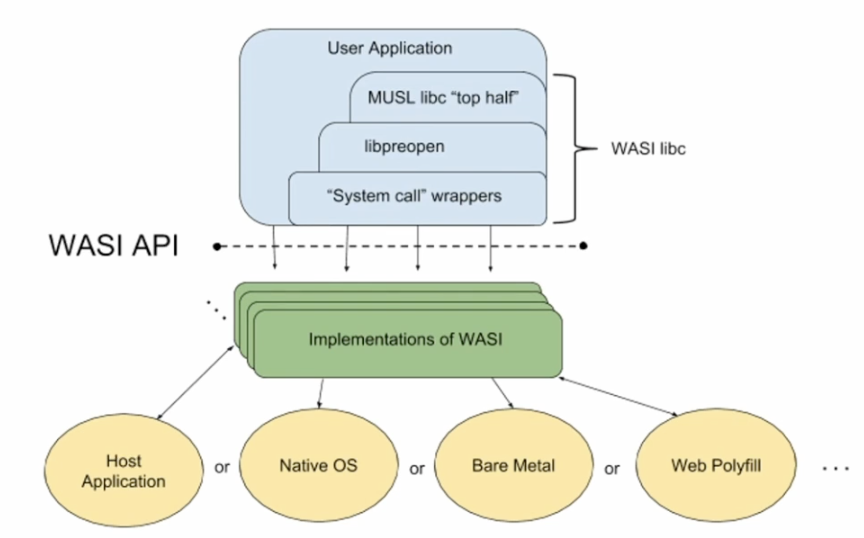
- Clang with WASI-SDK compiles the C code into LLVM IR and LLVM applies optimizations to the IR
- LLVM IR is then lowered to Wasm instructions
- Object files generated are linked together using the LLD linker
- Linker links the program with wasi-libc, ensuring that standard library functions used in the C code are properly implemented
- WASM Runtimes
- Parsing and Validation - The runtime formats the binary format of the module and break it down the binary or SMB module in a way that runtime can understand and also perform validations like, type safety, unmapped memory, addresses,…
- Ahead of Time Compilation - use wasm byte code, compile it into some data machine code, before it gets executed, we also translate the wasm instructions into instructions that processor can execute directly and this is language agnostic, and this is pushed to any machine which have similar architecture
- Just in Time Compilation - Same as above but we compile when needed for specific architecture
- Execute - Run the code wrt specific things required and the access it haves
- The build spits out corresponding two kinds of files
.wasm- wasm binaries.wat- human-readable, S-expression-based textual representation of the WebAssembly (Wasm) binary format
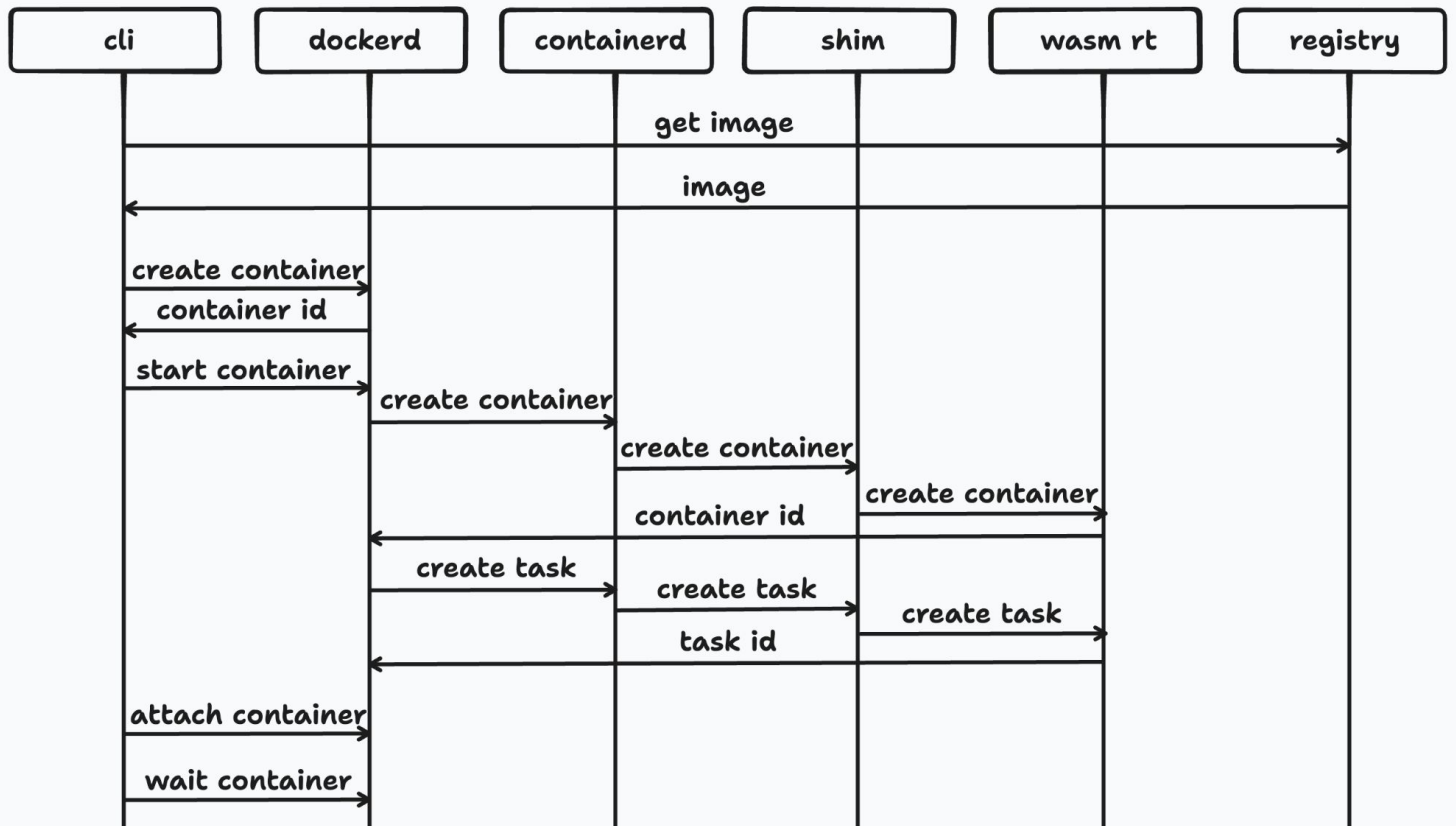
- Running WASM containers via docker
Component Model
- WebAssembly modules are low-level, memory-centric, and hard to compose safely across languages
- Real systems need language-independent APIs, safe composition, versioning, and tooling-friendly boundaries
- The Component Model exists to solve composition, interoperability, and abstraction at scale
A component is a higher-level unit built on top of WebAssembly modules. It focuses on interfaces, not raw memory or function signatures
Components are designed to be composed safely, even when built by independent parties
- WASM module → execution unit
- WASM component → composition + API unit
Wasm Interface Types (WIT):
- WIT is the IDL (Interface Definition Language) of the Component Model. It defines what goes in and comes out, independent of language or ABI
- It’s not runtime code, it’s a contract
- WIT describes
Interfaces- An interface is a named collection of functions and types- Example idea (conceptual): file system interface, http interface, crypto interface
- Interfaces are language-agnostic, strongly typed, and version-able
Worlds- It defines “what a component imports and exports”- It’s like “a capability boundary” and “an environment contract”
- A component is instantiated inside a world
- Important thing is “default world exists” and “worlds enable ecosystem-scale composition”
functions,records,enumsandresources
- Component instances have deterministic destructors, this means resources are cleaned up predictably, no GC dependency, and suitable for systems programming
- Lifting and Lowering - When data crosses component boundaries:
- Lowering: high-level types → core WASM representation
- Lifting: core WASM representation → high-level types
- This is done by compiler automatically
- Capability Based Security - Components do not get ambient authority, they only access “what the world provides” and “what interfaces allow”
- There is module linking which happens that link multiple modules together, resolve imports at link time and makes code for better reuse
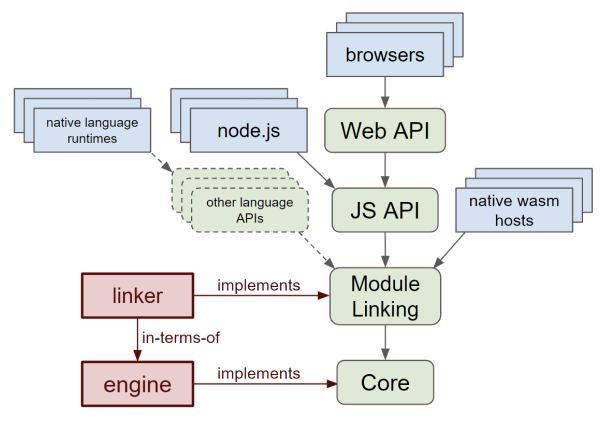
- With WASI
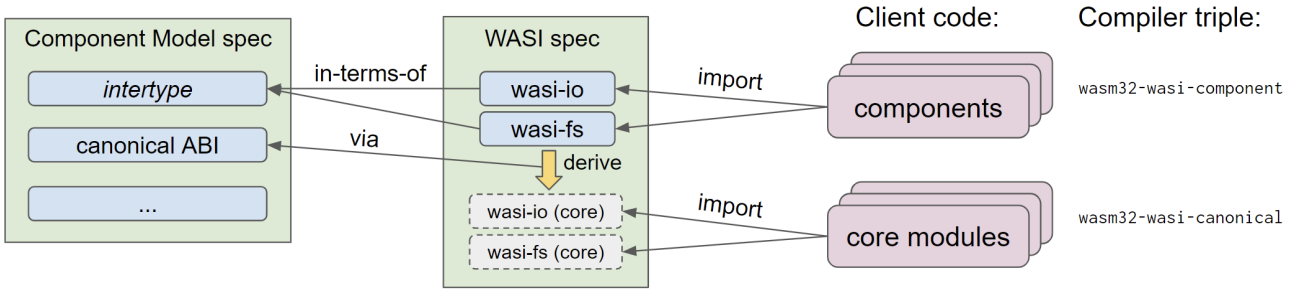
- All at once
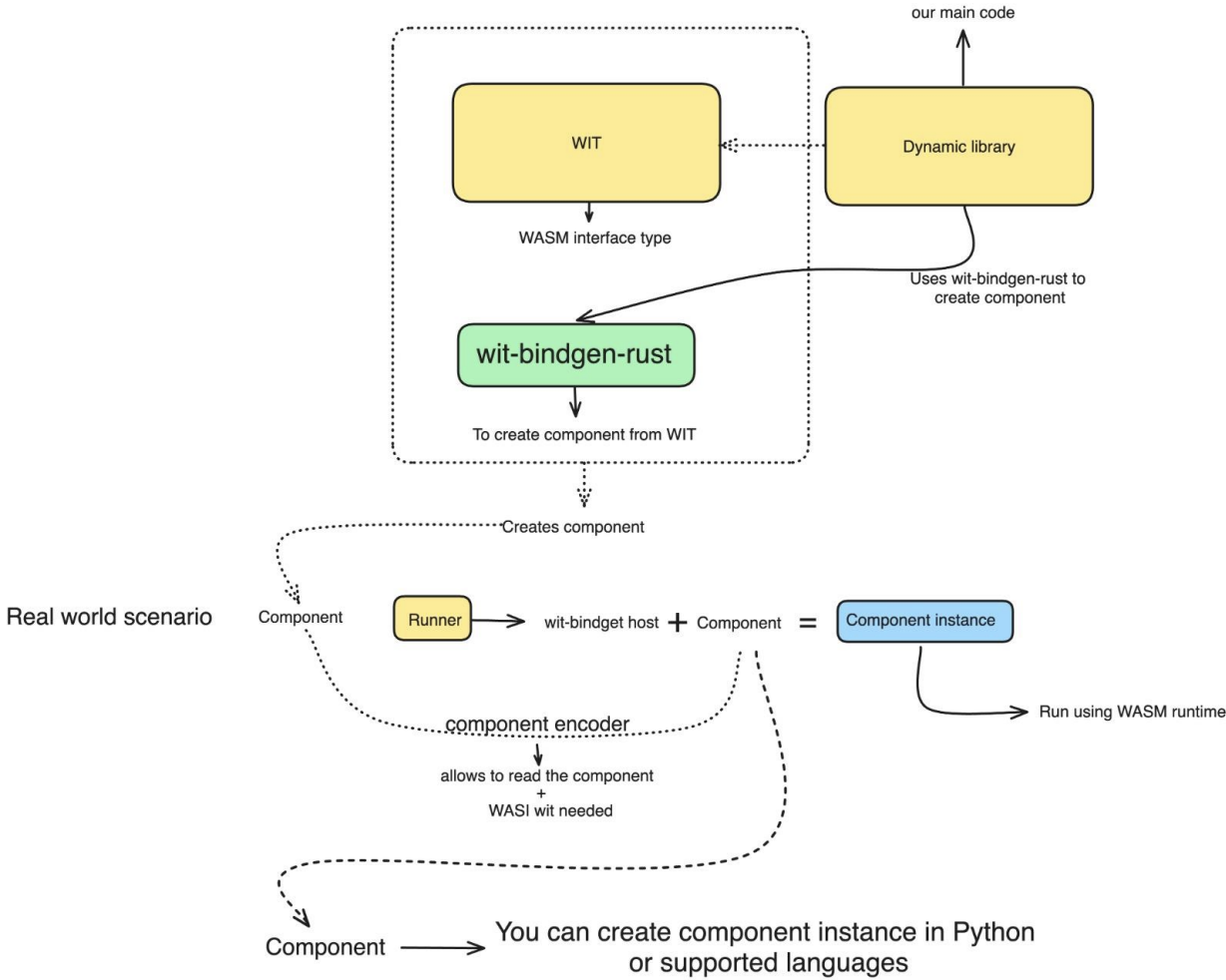
Q Difference between Components vs Modules ?
A
- WebAssembly module has linear memory, tables, globals, and executes instructions
- WebAssembly component is built from one or more modules and encapsulates module internals, it exposes only typed interfaces and hides memory completely
- Modules are implementation details inside components
Observability for WASM Modules
Generally in systems, we collect metrics via daemon set or a side case, but WASM modules do not know about the host as it don’t have access to the system, so here we use WASI Logging which push the logs to stderr and get it from there
And also timestamps for metrics, we also need system clock and IPC calls
WASM Compilation
General Compilation Process:
- WebAssembly is a compilation target, not a language
- Source language → frontend → IR → WASM binary
- Two broad execution modes:
- Browser WASM → JS host APIs
- WASI / standalone WASM → OS-like APIs
Guide for Different Languages:
- Golang
- Go compiler has a native
wasmbackend. Target:GOOS=js GOARCH=wasm - It outputs:
.wasmbinarywasm_exec.jsruntime shim
- Coming to Runtime
- Go runtime runs inside WASM
- It includes goroutine scheduler and garbage collector
- Depends heavily on JavaScript event loop
- WASM module is not standalone, JS drives execution
- GC runs inside WASM → higher overhead, Startup time is relatively slow
- Go compiler has a native
- Rust
- Rust is the best-supported systems language for WASM
- Targets:
wasm32-unknown-unknown→ bare WASMwasm32-wasi→ WASI runtimewasm32-unknown-emscripten→ legacy
- Runtime Model
- No runtime unless you include one
- No GC (unless using
gcproposals or libraries) - Deterministic memory usage
- Python
- Python does not compile directly to WASM. Two main approaches:
- Compile CPython itself to WASM
- Transpile Python → JS → WASM (limited)
- Runtime model
- Python interpreter runs inside WASM
- Huge runtime footprint
- Python bytecode still interpreted
- It has large WASM binaries and have slow startup with poor performance
- It’s mostly used in scientific computing
- Python does not compile directly to WASM. Two main approaches:
- Javascript
- JavaScript does not compile to WASM directly, JS is the host language, not the source language. But there are cases:
- JS engines internally JIT to WASM-like IR
- Tools like AssemblyScript use JS-like syntax
- JavaScript does not compile to WASM directly, JS is the host language, not the source language. But there are cases:
- Elixir
- Elixir runs on BEAM (Erlang VM). So compilation path is indirect. Two experimental approaches are:
- Compile BEAM VM to WASM
- Compile Elixir → Erlang → Core Erlang → WASM (research)
- Runtime Model
- BEAM runs inside WASM
- Actor model preserved
- Scheduler inside WASM
- It has very heavy runtime, with message passing overhead and not suitable for tight loops
- The good thing is concurrency model survived and fault tolerance is preserved
- Elixir runs on BEAM (Erlang VM). So compilation path is indirect. Two experimental approaches are: